BLUEPRINT SAFETY / TOOLBOX TALK LIBRARY
In development · iPhone & Android
Hold the talk.
Keep the record.
I’m building Toolbox Talk Library to keep the talk, crew sign-ins and session record together. A foreman can pick a topic, select the crew and save who took part.
If you’re interested in an early test, leave your email. I’ll get in touch if a testing round opens. There’s no release date yet, and signing up doesn’t commit you to buying anything.
TALKS + SIGN-IN TRACKING
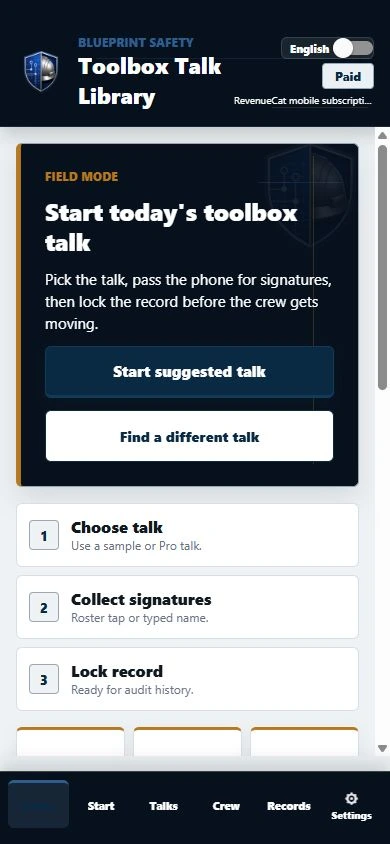
Pick a talk, record the crew, save the session
I’m building it for foremen and safety leads who run toolbox talks and want the sign-in record with the talk. Choose a topic, set the jobsite and presenter, then record who took part.
Choose the talk
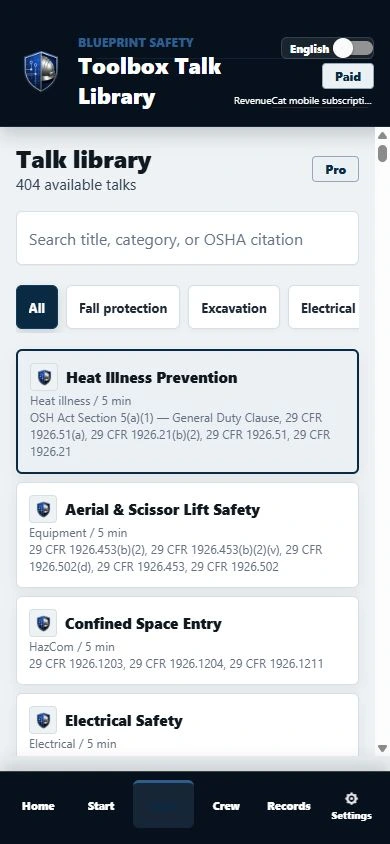
Find talks by title or category, or return to a saved favorite. Choose the one that fits the work your crew is doing.
Bring in the crew
Choose a saved jobsite and presenter, then pick workers from your roster or enter names and collect signatures.
Save the session
Review the session, then finalize it to keep the timestamp and sign-ins together. If something needs correcting later, add a note.
01 / THE TALK LIBRARY
Find a talk for the work ahead
Search by title, category or OSHA citation, or save a favorite for later. The talk screen keeps the discussion material close to the session record.
- Search and category filters
- Favorites for repeat use
- Seasonal topic suggestions
- Original-sheet previews where available
02 / ENGLISH + SPANISH
Use the language
your crew works in.
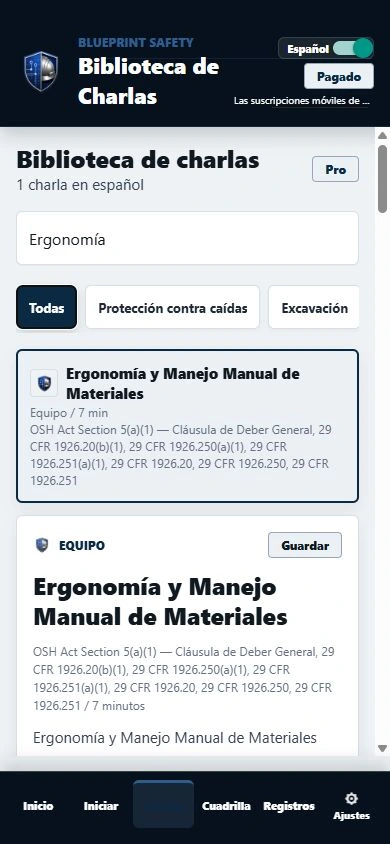
Switch the library between English and Spanish, or find a Spanish-language talk before the crew gathers. The talk material stays with its topic in the app.
The screen shown here is a real Spanish-language search from the development build. The interface and library are still being refined.
03 / THE RECORD THAT FOLLOWS
Keep the sign-in with the talk
Offline field use
Open talks you’ve already cached and continue recording attendance when the connection drops. You need a connection to sign in, update the library and check your subscription.
Reusable crews and jobsites
Save worker rosters and jobsite details so you don’t have to enter the same names for every session.
Digital attendance
Add a typed name or choose a worker from the roster, then record a signature for the talk, presenter and jobsite.
Locked session records
When you finalize a session, it keeps its timestamp and sign-ins. Add a correction note later without overwriting the original record.
Worker and jobsite history
Look up earlier sessions, who attended and which talks a worker or jobsite has covered.
PDF and CSV exports
Prepare attendance reports in PDF or CSV. Exports are part of the Pro workflow still in development.
Digital signatures document internal attendance. Subscription details and final feature availability will be confirmed before release.
BEFORE YOU JOIN
A few straight answers.
Can I download the app now?
Toolbox Talk Library is still in development. There’s no public download or release date yet. Leave your email below if you’d like to hear about testing.
Will the app work without cell service?
When a connection drops, you can use cached talks and keep field records on the device. You’ll need internet to log in, update the library and check subscription status.
What will testing involve?
I’ll share testing details when the build is ready. Joining the list lets me know you’re interested; it doesn’t guarantee an invitation or commit you to a purchase.
Can I get toolbox-talk materials today?
Yes. I can prepare toolbox-talk materials for your crew while the app is being built.
IN DEVELOPMENT
Want to try an early build?
If you’d like to try an early build, leave your email below. I’ll reach out if a test round opens.
No release date has been set. Screens show the current development build; features and appearance may change.
Express interest in testing
By submitting, you agree that Blueprint Safety may email you about app testing. You can request removal by emailing Mike@blueprint-safety.com. Read our Privacy Policy.